
Start a table, then send your players a link. Takes about a minute.
What you need
- Nothing but the names of the people you want at the table. You don't need their accounts set up, and you don't need characters yet.
- A way to message them. MythWeaver doesn't send the invite for you. It gives you a link and you send it however you already talk to your table.
On the free plan you get three campaigns, and each one seats five players besides you. Paid plans lift both.
Start the campaign
1. Go to Campaigns and press New campaign.
If you've never made one, the page says Start your table and puts the doors side by side. Take New campaign, the gold one on the left. I have an invite is for joining somebody else's game. Start one with Weavy gets you to the same place by asking you a couple of questions first.

2. Name the table, check the game, and press Create campaign.
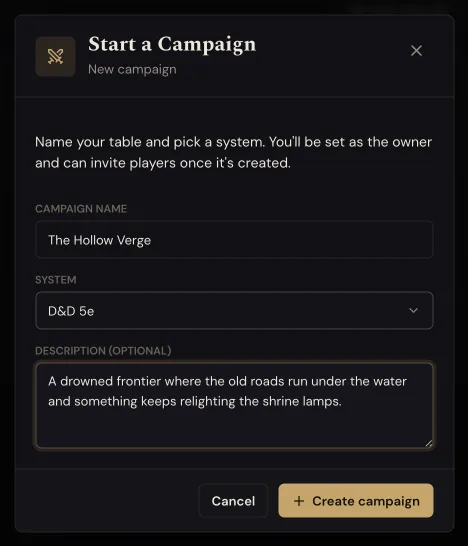
Game defaults to D&D 5e. Change it if you play something else.
The description is optional and your players see it on the invite, so a sentence about the setting is worth the ten seconds.
Get your players in
3. On your new campaign, press Invite your players.
It's the first thing under Get started.
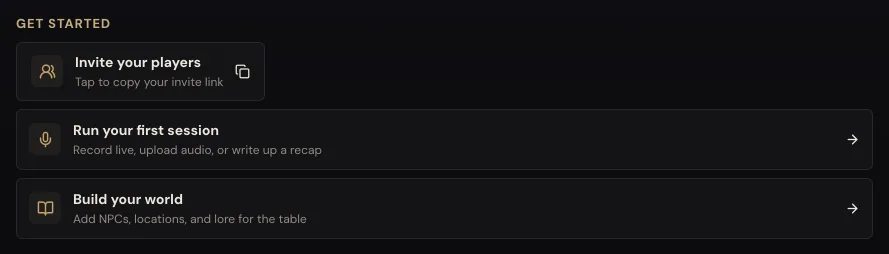
This copies a link. It doesn't send anything. The line under the button flicks over to "Copied. Send it to your players." for a second or two, and that's the whole of what happens. The link is now on your clipboard and nothing has left the app.
4. Paste it wherever your table talks. Group chat, Discord, email, all the same.
One link works for everybody. You don't need one per player, and you can press the button again any time to copy it again.
The button stays on your campaign page, but it moves. Once your first session has a recap, Get started makes way for it, and Invite your players reappears at the bottom of The party, on the right. Same button, same link.
What your players see
They open the link and get your campaign name, the game you picked, your description, who is at the table so far, and an Accept invite button.
They see all of that whether or not they have an account. Somebody who isn't signed in gets the same page with Sign in to join instead, so they know what they are joining before they hand over an email address.
If they're already signed in, the page also says which account will join, with Not you? Switch account right under it. That's there for a shared computer, where the browser can be signed in as somebody else.
Once they accept they land in your campaign, and MythWeaver points them at making a character.
How to tell it worked
The table, on the right of your campaign page, counts up. You're at the top marked DM, and each player shows who they play, or No character yet until they make one.
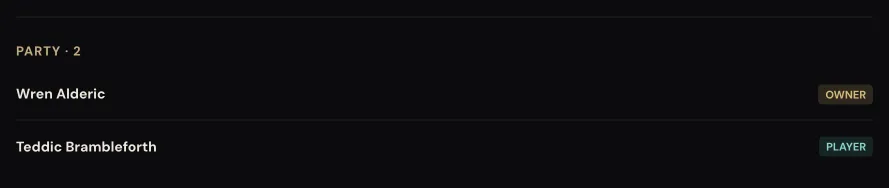
The party, just above it, only lists characters, so it stays empty until somebody makes one. Until somebody accepts the invite, The table stays at one. That isn't a problem with the invite, it just means nobody has accepted it yet.
If something goes wrong
Nothing seems to have happened when you pressed the button. It copied the link. Paste somewhere to check. The confirmation is brief and easy to miss.
You lost the link. Press Invite your players again. You get the same link back, so anything you already sent still works.
Somebody says it's asking them to sign in. That's the normal path for a player who doesn't have an account yet. They can read the whole invite first, Sign in to join brings them back to it once they're in, and Accept invite takes them into your campaign.
Your player says the campaign is unavailable, or the invite didn't work. Check what you sent them. The address in your browser's address bar is your campaign page, and it only opens for people who are already in the campaign. Anyone else gets "Campaign unavailable", or "That link opens the campaign, not an invite" if they paste it when they sign up. Press Invite your players and send that link instead. It's the one with /invite/ in it.
Your player is on a shared or family computer. Have them read the line under Accept invite before they press it. If it names somebody else, Not you? Switch account has them sign in as themselves and brings them back to your invite.
You need a sixth player. The free plan seats five besides you. The sixth needs a paid plan.
Next
Import a character sheet they already have, so nobody retypes a character to join your game.